

Sign up at vidIQ to get your Free Plan
Sign up at tubebuddy to get your Free Plan

If you’re serious about growing your YouTube channel, you’ve probably heard about and looking at vidIQ vs tubebuddy.
Both tools promise to help you optimize videos, attract more views, and grow subscribers faster. But which one actually delivers results? In this detailed 2025 comparison, we’ll examine features, pricing, and real-world performance to help you choose the right tool for your channel.
vidIQ vs tubebuddy? What Are They?
Both VidIQ and Tubebuddy are YouTube optimization tools designed to help creators make better content decisions. They work as browser extensions and web platforms, providing data and insights about your videos and competitors.
VidIQ focuses heavily on keyword research, competitor analysis, and AI-powered suggestions. It’s known for its clean interface and powerful analytics dashboard.
Tubebuddy positions itself as a comprehensive YouTube management suite with tools for optimization, bulk processing, and A/B testing. It’s been around longer and offers more workflow automation features.
Key Features Breakdown: vidIQ vs tubebuddy
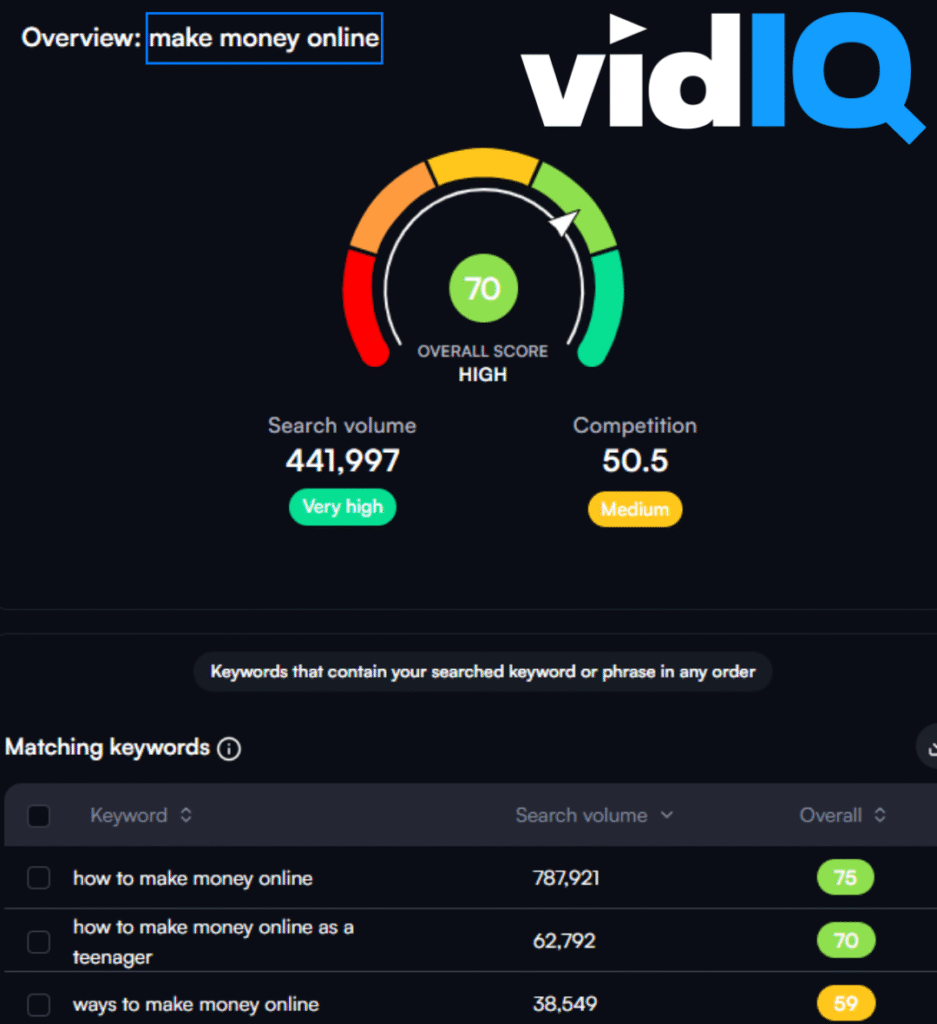
Keyword Research and SEO Tools
VidIQ’s Approach:
VidIQ excels at keyword research with its Keyword Inspector tool. It shows search volume, competition scores, and related keywords in real-time. The platform provides keyword difficulty ratings and suggests long-tail variations that are easier to rank for.
Tubebuddy’s Method:
Tubebuddy offers keyword research through its Keyword Explorer, which provides similar data but with a different scoring system. It includes a unique “Keyword Score” that combines search volume with competition levels to give you a single ranking metric.
Video Analytics and Performance Tracking
VidIQ’s Analytics: VidIQ provides detailed analytics with hourly view tracking, audience retention analysis, and competitor benchmarking. The platform shows you exactly when your videos perform best and compares your metrics against similar channels.
Tubebuddy’s Analytics: Tubebuddy focuses on actionable insights with its Video Health Report and Channel Health features. It provides A/B testing capabilities for thumbnails and titles, helping you optimize based on actual performance data.
Competitor Analysis
VidIQ’s Competitive Intelligence: VidIQ’s competitor tracking is comprehensive. You can monitor competitor uploads, track their most successful videos, and see which keywords they’re ranking for. The tool even suggests content gaps you could fill.
Tubebuddy’s Competitor Features: Tubebuddy offers competitor scorecards and the ability to track competitor tags and optimization strategies. However, its competitor analysis features are less detailed than vidIQ’s offerings.
Thumbnail and Title Optimization
VidIQ’s Optimization Tools: VidIQ provides thumbnail preview tools and title suggestions based on trending keywords. The platform’s AI suggests improvements for better click-through rates.
Tubebuddy’s A/B Testing: This is where tubebuddy shines. Its A/B testing feature lets you test different thumbnails and titles with real audience data, showing you exactly which versions perform better.
Bulk Processing and Workflow Tools
VidIQ’s Workflow Features: VidIQ keeps things simple with basic bulk editing capabilities and scheduled uploads through its web platform.
Tubebuddy’s Automation: Tubebuddy excels here with extensive bulk processing tools. You can update cards, end screens, descriptions, and tags across multiple videos simultaneously. It also offers template systems for consistent branding.
Feature Comparison Table – vidIQ vs tubebuddy
| Feature | vidIQ | tubebuddy |
|---|---|---|
| Keyword Research | ✅ Advanced with difficulty scores | ✅ Good with unified scoring |
| Competitor Analysis | ✅ Comprehensive tracking | ✅ Basic competitor insights |
| Video Analytics | ✅ Hourly tracking & benchmarking | ✅ Health reports & insights |
| Bulk Editing | ✅ Basic functionality | ✅ Extensive automation |
| Tag Suggestions | ✅ AI-powered recommendations | ✅ Tag rankings & suggestions |
| Thumbnail Tools | ✅ Preview & suggestions | ✅ A/B testing capabilities |
| Channel Audit | ✅ Comprehensive analysis | ✅ Health scoring system |
| Trend Alerts | ✅ Real-time notifications | ✅ Trending topic tracking |
| Mobile App | ✅ Full-featured app | ❌ Limited mobile access |
Pricing Comparison
VidIQ Pricing:
- Free Plan: Basic keyword research and limited analytics – Daily AI-powered video ideas (3 per day), basic competitor tracking (3 competitors), a video scorecard for analyzing performance, basic video analytics, keyword research with limited results (3 per search), limited generative AI tools for titles, outlines, and scripts, and access to the vidIQ Academy. It allows users to optimize one video at a time
- Boost Plan: $16.58/month (yearly up front) – Advanced analytics and AI features – Free Plan + Optimize all your videos, Create unlimited blueprints with AI Tools, Unlimited Thumbnail Generations, Unlimited Keyword Researches, vidIQ & Industry Professional Lessons, Unlimited questions on Basic & Advances AI Chats, Unlimited Subscriber Insights
- Coaching: $99/month (yearly up front) – Free Plan + Boost Plan + Private, one-on-one YouTube Coaching that includes channel audit & step-by-step growth plan (weekday access to 1-on-1 coach)
Tubebuddy Pricing:
- Free Plan: Basic optimization tools with limited usage: Upload Checklist and Canned Responses, limited SEO features such as restricted access to Keyword Explorer and Suggested Tags, and basic analytics like Channel Valuations and Comment Word Clouds.
- Pro Plan: $12.00/month (yearly up front) – Enhanced features with higher limits: Free Plan + Basic Video and Thumbnail Tools and Basic title and tag optimization
- Legend Plan: $26.39/month (yearly up front) – Full automation and bulk tools: Pro Plan + Content Strategy Tools, Advanced reporting and analytics, Full search and SEO access, Bulk Processing/Editing Tools, Audience Understanding Tools, YouTube Shorts Linking, Topical Analysis
- Enterprise Plan: Custom pricing – For brands with 3+ channels
User Experience and Learning Curve
VidIQ’s Interface: VidIQ offers a clean, intuitive dashboard that’s easy to navigate. New users can start seeing value within minutes. The data presentation is clear, and the AI suggestions are easy to understand and implement.
Tubebuddy’s Complexity: Tubebuddy has more features, which can make it overwhelming for beginners. However, once you learn the system, the automation capabilities can save significant time. The interface feels more cluttered but offers more functionality.
Performance and Reliability
Both tools are generally reliable, but there are differences:
VidIQ Performance: VidIQ loads quickly and provides real-time data updates. The browser extension is lightweight and doesn’t significantly slow down YouTube’s interface.
Tubebuddy Reliability: Tubebuddy can sometimes feel slower, especially when processing bulk operations. However, its extensive feature set means more background processing is happening.
Customer Support and Resources
VidIQ Support: VidIQ provides responsive customer support with extensive documentation and video tutorials. Their YouTube channel regularly features tips and best practices.
Tubebuddy Resources: Tubebuddy offers comprehensive support with a detailed knowledge base, community forums, and regular webinars. Their educational content is particularly strong for beginners.
Real-World Use Cases
For New YouTubers
If you’re just starting, vidIQ might be the better choice. Its simpler interface and focus on keyword research help new creators understand YouTube SEO fundamentals without getting overwhelmed.
For Established Channels
Channels with existing content libraries often benefit more from tubebuddy’s bulk processing capabilities. The ability to optimize hundreds of videos simultaneously can dramatically improve channel performance.
For Data-Driven Creators
VidIQ’s advanced analytics and competitor tracking features appeal to creators who make decisions based on detailed data analysis.
For Efficiency-Focused Users
Tubebuddy’s automation tools are perfect for creators managing multiple channels or those who want to streamline repetitive tasks.
Which Tool Is Right for You?
Choose vidIQ if:
- You prioritize keyword research and competitor analysis
- You prefer a clean, simple interface
- You want detailed analytics and performance tracking
- You’re comfortable with a higher price point for advanced features
- You need mobile access to your analytics
Choose tubebuddy if:
- You need extensive bulk editing capabilities
- A/B testing is important to your strategy
- You want comprehensive workflow automation
- You prefer lower pricing tiers
- You manage multiple channels or large content libraries
Cost Considerations
For budget-conscious creators, tubebuddy starts at a lower price point however ensure the Pro Plan has what you need as the Legend Plan is over double the cost for many advanced features.
VidIQ’s pricing reflects its advanced analytics capabilities and AI-powered features with one price that provides all advanced features for only a small amount higher than tubebuddy.
Consider your monthly YouTube revenue when choosing. If you’re earning $500+ monthly from YouTube, either tool will likely pay for itself through improved optimization.
The Bottom Line: vidIQ vs tubebuddy
Both vidIQ and tubebuddy are powerful YouTube optimization tools, but they serve different needs. VidIQ excels at research and analytics, making it ideal for data-driven creators who want to understand their market deeply. Tubebuddy focuses on efficiency and automation, perfect for creators who need to manage large amounts of content.
Your choice ultimately depends on your workflow, budget, and specific needs. Many successful creators actually use both tools, leveraging vidIQ for research and tubebuddy for bulk optimization tasks.
The most important factor isn’t which tool you choose, but how consistently you use it to optimize your content. Either tool, used properly, can significantly accelerate your channel’s growth.
Start with the free versions of both tools to see which workflow feels more natural for your content creation process. The tool that you’ll actually use consistently is the one that will drive the best results for your channel.
Sign up at vidIQ to get your Free Plan
Sign up at tubebuddy to get your Free Plan
This post contains affiliate links. We may earn a commission if you make a purchase through these links, at no extra cost to you. Thank you for supporting our work.